

UPS SERVICE
Shipping & Returns
STORES
Find retail locations
FREE SHIPPING
For orders above €100
CUSTOMER CARE
For All Your Questions

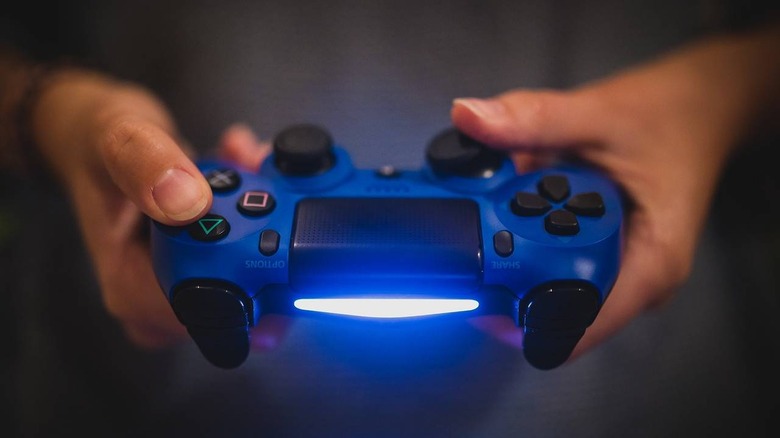
The Sony PlayStation 4 DualShock controller, commonly known as the DualShock 4, remains one of the most recognisable gaming controllers of the PlayStation era.
Designed for the PlayStation 4, the controller combines a familiar PlayStation button layout with wireless connectivity, motion controls, a touchpad and other interactive features.
For players who still enjoy PS4 games or need an additional controller for multiplayer gaming, the DualShock 4 continues to offer a comfortable and practical gaming experience.
One of the strongest features of the DualShock 4 is its comfortable design.
Sony retained the classic PlayStation layout while improving the shape of the grips and positioning of the analogue sticks and triggers.
The controller includes the familiar:
This familiar layout makes the controller easy to use for both experienced PlayStation players and new users.
The DualShock 4 connects wirelessly to the PlayStation 4 using Bluetooth technology.
Wireless connectivity gives players greater freedom to sit comfortably without needing a cable connected to the console.
The controller also includes a built-in rechargeable battery, so users can charge it and continue playing without constantly replacing disposable batteries.
One of the most distinctive features introduced with the DualShock 4 is the touchpad located in the centre of the controller.
The touchpad can detect touch gestures and can also function as an additional button.
Game developers use it in different ways depending on the title. It can be used for activities such as navigating menus, controlling maps, activating in-game functions or interacting with specific game mechanics.
The DualShock 4 includes built-in motion sensors.
These sensors allow compatible games to detect movement and rotation of the controller.
Motion controls can be used for aiming, steering, interacting with objects or performing other movements depending on the game.
Although not every game relies heavily on motion controls, the feature adds another level of interaction beyond traditional buttons and analogue sticks.
The controller also features a distinctive light bar.
The colour of the light can change depending on the game and can be used to indicate different players, game status or other information.
Some PlayStation titles use the light bar as part of the gameplay experience, while it can also help identify individual controllers during local multiplayer sessions.
Another interesting feature is the controller’s built-in speaker.
Supported games can send certain sound effects directly through the controller.
For example, a game may use the speaker for notifications, character communication or special sound effects.
This can create a more immersive gaming experience by bringing some audio closer to the player.
The DualShock 4 includes a 3.5mm stereo headset jack.
This allows players to connect compatible wired gaming headsets or headphones directly to the controller.
It can be particularly useful for late-night gaming, online multiplayer or situations where you don’t want game audio playing through the television.
Sony introduced the dedicated Share button with the DualShock 4.
This allows players to capture gaming moments, screenshots and gameplay footage more easily.
For gamers who enjoy sharing achievements, funny moments or impressive gameplay clips, the Share button makes content capture much more convenient.
Having an additional DualShock 4 controller is useful for local multiplayer gaming.
Depending on the game, multiple players can connect controllers to the same PlayStation 4 console and play together.
This makes extra controllers useful for:
For households with multiple gamers, having more than one controller can make the PlayStation experience much more enjoyable.
The DualShock 4 can also be used with many PC games.
Depending on the game and computer setup, players may connect the controller through USB or Bluetooth.
Compatibility can vary between games, so PC users should check whether their chosen game supports PlayStation controllers.
The Sony DualShock 4 can still be a useful choice for:
When purchasing a DualShock 4 controller, it is important to check whether the product is genuine Sony hardware.
Because the controller has been popular for many years, there are many third-party and imitation controllers on the market.
Check the product description carefully and confirm:
This is especially important when purchasing replacement or pre-owned controllers.
The Sony PlayStation 4 DualShock controller remains a well-designed gaming controller with a comfortable shape, responsive controls and several useful features.
Its wireless connectivity, touchpad, motion sensing, built-in speaker and headset support helped make it an important part of the PlayStation 4 experience.
For anyone still enjoying PS4 games or looking for an additional controller for multiplayer sessions, the DualShock 4 can still be a practical addition to a gaming setup.
Upgrade your gaming setup with NexTech and explore controllers, gaming accessories and more.ad
No account yet?
Create an Account